Improving the e-commerce usability for Angelibebe
Summary
We started the project with a stakeholder interview withe Angelibebe’s CEO. Thereafter, referring to existing literature from McKinsey & Company and Baymard, we identified some best practices for the e-commerce space.
Next, we ran a detailed heuristics analysis and validated the findings of it with a formal usability test. The tests confirmed some of the issues that we had identified in our heuristics analysis e.g. unclear copies and bad visual feedbacks that gave the wrong message to the users. We also looked at the Google Analytics to determine the number of traffic for different device types as well as how much revenue is generated for each device type. From the analytics data, we also found that users are likely to abandon the check-out process.
To help us understand our user’s behaviours, we started recruiting people via Angelibebe’s social media accounts. Our findings from the interviews were consistent with the analytics data. Many users reported having a preference to buy and purchase on their mobile rather than their desktop.
Having completed the usability tests and interviews, we started to think about the user flows. We drew the wireframes on a whiteboard and started building the prototype. From our prototype, we conducted a usability test to find key issues on the first and subsequent prototype.
The results from our first prototyped showed room for improvements. When we ran the usability test on our second prototype, we found that users appeared generally more confident and less prone to frustrations and errors than on our first prototype and the current website.
My Role
UX Strategist, User Researcher, Technology Advisory
Tools
Google Form, Axure, Principal, Video & Microphone, Google Analytics
UX Methods
Stakeholder Interview, Literature Review, Recruitment Screeners, Rapid Prototyping, User Interviews, Affinity Mapping, Mental Models, Usability Testing, Persona, Journey Mapping, Technology Recommendations, Heuristics Analysis
Team Members
- CJ Heng
- Alex MWD
The challenge
Angelibebe is an online e-commerce store selling mid-to-high luxury children’s clothes. The store prides itself on its excellent and personalised customer service, free shipping and easy returns. Our challenge was to:
- Find usability issues in the current website
- Uncover valuable insights about shopper’s behaviours
- Improve the mobile checkout process
- Identify areas of improvement in the buying process
- Re-develop the store’s content strategy
- Make recommendations for web technologies that can be used to improve usability aspects
The process
Kickstarting the project interviewing the CEO.
To better understand the business, we spoke to Joana who is the CEO of Angelibebe.
From our interview with her, we understood the following challenges:
- The check-out process is too long and can be made simpler.
- Customers are likely to leave the page after searching for a product.
- Customers only buy from Angelibebe on special occasions.
- There is more traffic via mobile than via desktop or laptop machines.
Identifying the best practices and knowing what other competitors are doing
As part of process, it was important for us to do a literature review. We relied on articles and findings from Baymard and McKinsey to know more about best practices in the e-commerce space. Additionally, we looked at and analysed the websites of both direct and indirect competitors. These competitors include ChildrenSalon, Melijoe, Shan & Toad and LoveBonito.
From our internal research, we found these insights helpful:
- Customers are likely to abandon their cart if they see a field for coupon or promotion code.
- Adding a “sales” link as a menu item in the main navigation is likely to increase store revenue.
- Including a number indicator on the cart icon eliminates the need for customers to click on the icon to check their carts
- To help customers look up at items for later viewing, competitors added a wishlist feature.
- Some competitors utilise their social media account (e.g. Instagram) to curate featured looks. Each post contains a link to a page where the look can either be bought as a whole or as individual pieces.
Studying Google Analytics data logs.
Reviewing the analytics, we observed the following insights:
- Number of incoming traffic by device type influences the sales revenues. We found that more sales were generated from customers who use their mobile than the desktop. We deduced from it that customers are more likely to buy on their mobile phones than their laptops.
- Many customers dropped out when they arrive at the check-out page.
- Large numbers of the incoming traffic to the store came from Facebook.
Conducting a heuristics analysis to find usability issues
Using Nielsen’s heuristics, we identified these main issues:
- Poor system feedback. Users thought the site was being unresponsive when they saw a white overlay after applying a filter. They associated the white overlay with “browser crashes”.
- Unclear copies used. Users were confused by some of the copies used on the site. For example, some thought “outlet” referred to physical stores (and not sales as originally intended).
- Lack of glanceable information. Users needed to go into their to know the number of items already added or make changes to it. There is no way for them to quickly glance or amend this information from the cart icon.
- Placement of error messages. Error messages are currently placed far away from where the error occurred. Additionally, we noticed that some non-error messages used the same format of an error message. This resulted in people thinking that the non-error messages are actually errors.
Recruiting people to the study to understand their behaviours
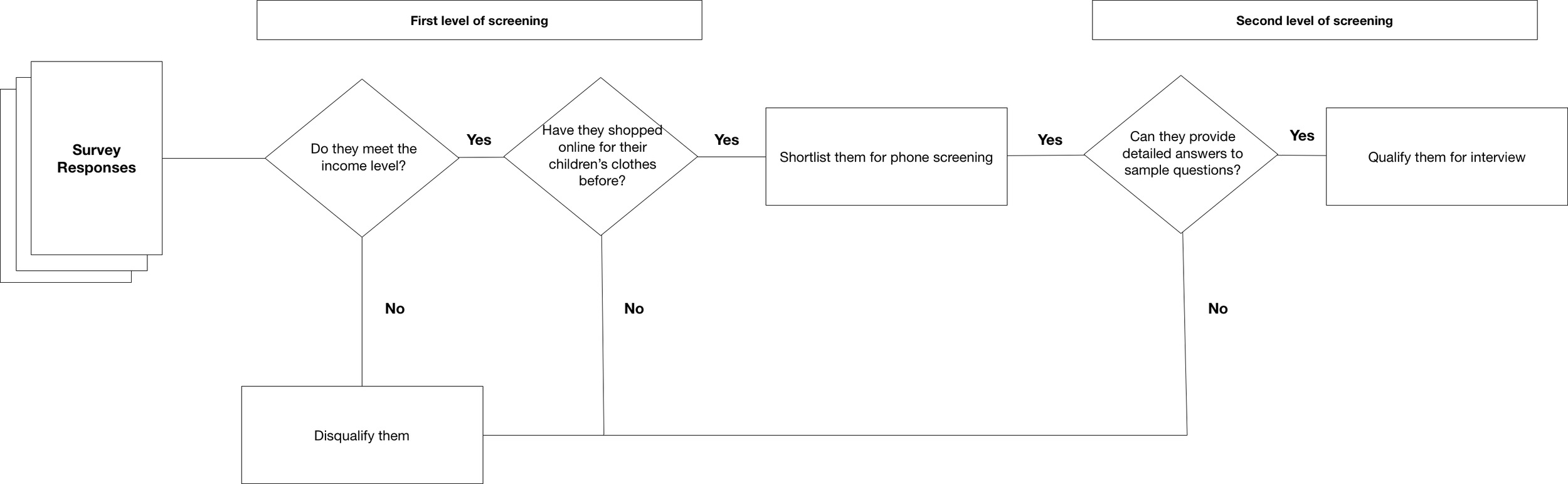 .
.
For this study, we conducted both formal and informal user interviews.
-
Formal interviews (pictured above). We recruited people over three days using Angelibebe’s social media. Then, we filtered the responses by income and whether they have done shopped online for their children before. Finally, we screened a second time over the phone. We asked sample questions and assessed them by the level of details in their answers.
-
Informal interviews. We visited shopping malls visited by many mothersto ask simple interview questions. In total, we interviewed 8 participants: 7 mothers and 1 grandmother.
Talking to people and extracting from the interviews online shopping behaviours
Grouping the user interview data, we built a mental model showing common behaviours and pain points. We observed the following:
- Product Information. Users think that being able to know the fabric type is as important as the look of the product itself.
- Customer reviews. Users rely on reviews to assess a store’s trustworthiness and to know what people say about the product.
- Special occasions and gifts. Users splurge more than average on special occasions. E.g. their children’s birthday, close friend’s children’s birthdays
- Repurposing clothes. Users tend to repurpose their children’s clothes either by passing it down to their younger children, selling it to other mummies, or donating it to charity.
- Mobile-first. Users were more likely to browse and buy via their mobile over other means. They also use the cart or wish list often to bookmark products for later viewing.
- Worries over the quality of the item. Users feel uncertain if the item quality is good.
- Indirect kin. Users who are related to the child, but not directly, are more willing to spend on good quality clothing even if it’s expensive e.g. grandparents
Understanding the current customer journey
We mapped the customer’s journey along four main stages.
- Initial consideration: At this stage, customers are getting to know about Angelibebe as an e-commerce store selling children’s clothes. They do initial research (e.g. asking for or browsing through Facebook for reviews) to get a sense of the store’s trustworthiness.
- Active Evaluation: In the active evaluation stage, customers begin browsing the product catalogue. If something catches their eyes, they click to find out more about the product. For example, they ask questions like, “What is this product made of?”, “What colours does it come in?”, “Will it fit my child?” Here, customers are also more likely to add items to their carts for later purchase or viewing.
- Closure: During the closure stage, customers either feel ready to buy or abandon their cart altogether. If they decide to buy, customers choose from the list of payment methods and proceed to checkout.
- Post-Purchase: At this stage, customers receive their packages in their mailbox. This stage is where they get to have the first look and feel of the items they bought. If they’re unsatisfied with the purchase, it’s here where they also request for a store return.
In each stage, customers are engaged in multiple activities. They also go through a wide range of emotional experience (e.g. uncertainty, happiness, frustration, etc). For more information, please click here.
Running usability tests to find issues on the current website*
We ran a usability test with a few users and found the following issues:
- Mobile users thought the site was unresponsive when they applied a filter at the product catalogue page and saw only a white background overlay.
- Placement of some key CTAs were not obvious to the user. E.g. Many users skipped seeing the filter button for both mobile and desktop versions.
- Mobile users struggled to find the link to view their past orders as it was hidden under a collapsed menu.
- Unclear labels such as “Sign up for 10%” (newsletters) led users to think it was the sign-up form for new accounts.
- Users thought the store only sold only for girls as they couldn’t see any photos of boys
Recommending technologies that may improve usability
We recommended using AJAX for two parts of the site: forms and the filters.
- Forms. Currently, users do not know they have entered the wrong input until after they submit the form. By using AJAX and client-side validation, we can allow for users to quickly correct their errors prior to submitting the form.
- Filters. Currently, the page refreshes each time the user applies a filter. If they wanted to apply a second filter, they had to wait till the first one is successfully applied. This can cause unnecessary wait time. Using AJAX, users can quickly apply several filters at once without the wait time.
- In addition, we proposed to use HTML5 History API to improve the load time for content. For example, with this API enabled, the first time a user initially filters by X and Y, the server returns the results (X+Y) and stores it on the local machine. If the user chooses the same filter (X and Y), the results will be fetched directly from the local machine instead of the server, thus improving the load time.
Results
Based on findings from prototype testing, we found that people generally appeared more confident. They were successful in finding the information they need. In addition, they said that being able to know the fabric a product is made of is useful.
They also found the check-out process simple. They appreciated that the process was task-driven and did not overload them with too much in one page.
Reflection
There were two key takeaways from this project:
- Recruiting the right people is difficult. No matter how thorough the screening is, there will always be one or two people who may not be the right person. Recruiting is, after all, a numbers game.
- Keeping communication within the team is essential for project success. Despite our workload, we tried to keep each other updated on our individual progress. But there were times when we failed at communicating. The failures taught me the importance of having a daily standup or a call to understand challenges faced and how we could best resolve them as a team.