Improving the payment experience for credit cards on the DBS Digibank App
Summary
Our challenge was to identify ways to improve the DBS Mobile Banking application.
We began the project with interviewing users and extracting insights from them that cover their goals and frustrations. We noted that while our users had issues with internet banking, they faced bigger issues (e.g. difficulty in reading transactions due to poor content organisation) when making payments for their credit cards.
Having researched, we then analysed the flows users take when making payment for their credit cards. We found there was redundancy in the payment process and some usability issues (e.g. incorrect payment amount entered) that can be improved
We created the prototype and sought feedback from existing DBS/POSB customers, and found that people enjoyed the new interactions (e.g. slide to pay) better. They also liked that the chance of them entering the wrong payment amount has been reduced as a result of our design changes.
My Role
User Researcher, Content Strategy, Interaction Design.
Tools
Survey, Realtimeboard, Sketch, Flinto, Video and microphone
UX Methods
User Interviews, Affinity Mapping, Public Data Analysis, Mental Model, Task Flow Mapping, Rapid Prototyping, Usability Testing, Personas, Journey Maps
Team Members
- Kenneth Lee
- Koh Khai Liang
The challenge
Find current usability issues on the mobile banking app
The process
**Identifying the top things people do on mobile banking. **We started the project by brainstorming as a team. Listing the common activities (or tasks) a person is likely to engage in when online banking, we then wrote the prioritised ones on post-its and asked existing DBS/POSB customers to sort the cards by their frequency of use.
From the survey, we determined the top five activities:
- Transfer funds between different bank accounts
- Check their account balance
- Review their billed and pending transactions for their existing cards
- Pay their bills (GIRO, credit cards, etc)
- Check their credit card bill’s due dates
Knowing what people are talking about the DBS digibank app. As we didn’t had access to internal bank data, we relied on public reviews left by the existing personal banking customers. We collected data from public sources: Facebook, Twitter and the Apple and Android app store pages.
From our research, we found the following insights:
- Missing features. Some features that were available on desktop were not available on mobile e.g. trading. Other features were once available in the mobile app, but were removed in subsequent application updates.
- Making fund transfers is troublesome. Users felt burdened having to carry their dongles around when adding a new payee. In addition, while business owners can click on share to inform their partners (e.g. a supplier) of a fund transfer, they are not able to copy and share the reference number.
- Difficulty in tracking expenses. Users reported that the ability to be able to tell how much money is spent on food and beverages, transport, etc will be helpful.
Talking to people and extracting common patterns when using digibank We recruited users to an interview where we asked them to talk about their experience of using their bank’s mobile banking application. We broadened the interview to include non-DBS online banking customers as we wanted to know what other banks are doing well that DBS is not. Our user interview questions revolved around themes such as:
- Touchpoint. Which touch point – desktop or mobile – do they use more frequently, and why?
- Activities. What do they currently use online banking for, and how do they currently carry out what they do?
- Past experiences. What was their past experience like of carrying out an activity they mentioned above?
- Physical branches. Do they visit a physical bank branch, and if yes, why?
- Expense tracking. How do they track their account balances and spending habits?
After finishing the interviews, we grouped the data points using affinity maps. This helped us to find patterns and distill user behaviours and characteristics for our personas.
From the research, we focused on solving the pain points associated with credit card payments and determined our product goals :
- Unify the bill payment experience for both DBS and non-DBS credit cards
- Reduce and prevent errors when entering a payment amount for the bill due
- Enhance the readability levels for the different types of transactions (e.g. billed, unbilled)
Looking at the current flow of how people pay their credit card bills. Mapping the user flow, we determined two distinct pathways users can take to make their bill payment. The difference between the pathways is that one allows you to pay for both DBS and non-DBS cards and the other, doesn’t.
We proposed to eliminate the flow that doesn’t and create a revised version of the flow that does accept payments for both DBS and non-DBS cards.
Build and test the prototype. We developed two prototypes for this case study. Each one had a different design and interaction framework. We ran a usability test on both prototypes and found these insights:
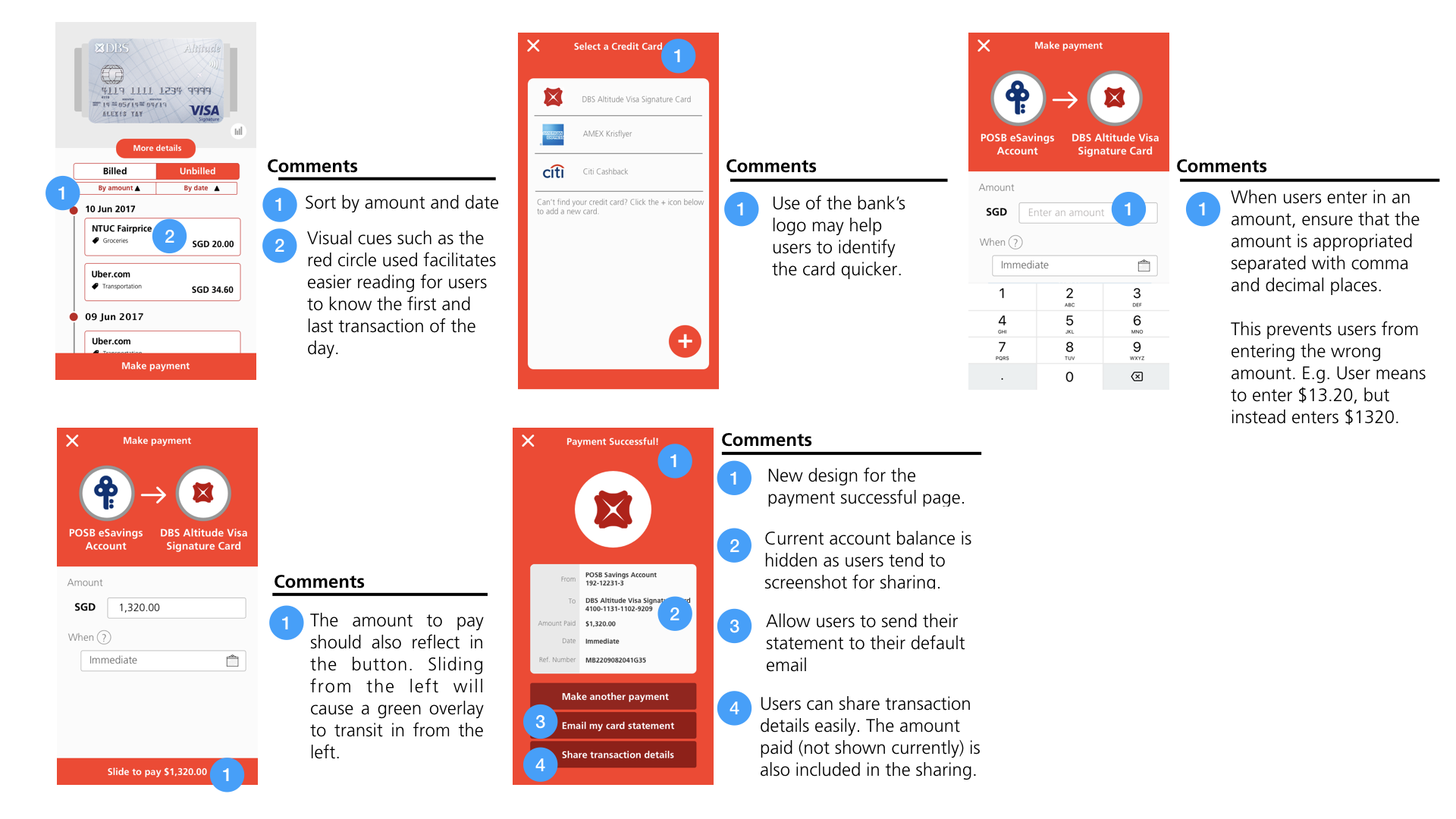
- Placement of the “Make a payment” button. In the first prototype, users missed seeing that button. We decided to follow the principles of “mobile comfort zones” and place it at the bottom of the screen for better visibility and easy access.
- Uncertainty if you could change credit cards at the make payment page. Users thought they could not change the credit card after selecting one from the card carousel.
- Poor affordances on important buttons. When users saw the “Slide to pay” button, they instinctively slide up instead of slide right (as intended). most users slide up instead of sliding right. on the “slide to pay” button resulted in users trying to slide up (instead of left as intended). We placed an arrow (of a darker shade of red) to indicate the direction they should slide in.
Combining the best of both prototypes, we eventually churned the third and final one.
 .
.
Results
The users we spoke to thought the interaction used for making payment (i.e. slide instead of click) brought an element of fun to doing online transactions. They also appreciated that tabbed navigations (instead of text links) were used which allowed them to easily switch between different views using swipe gestures.
Reflection
There were three key takeaways from this project:
- Make a conscious effort to consider the business goals. Whilst trying to satisfy user goals, we at times forget to consider the business goals. Always align your user needs back to business goals.
- When in disagreement, always test the idea out. Solve any differences in opinions for the solution by testing it out. The final prototype will never be what it is if not for the two earlier prototypes.
- Collaborating can be hard. We all have a vision of the product in our heads. Communicate the ideas out into the open and actively listen.